3D Asset Management for Apparel Teams: What to Look for in a Collaboration Platform (2026)
Learn what apparel teams should evaluate in a 3D asset and collaboration platform, including visual review, version management, product data, workflow visibility, asset management, and tech-pack handoffs.
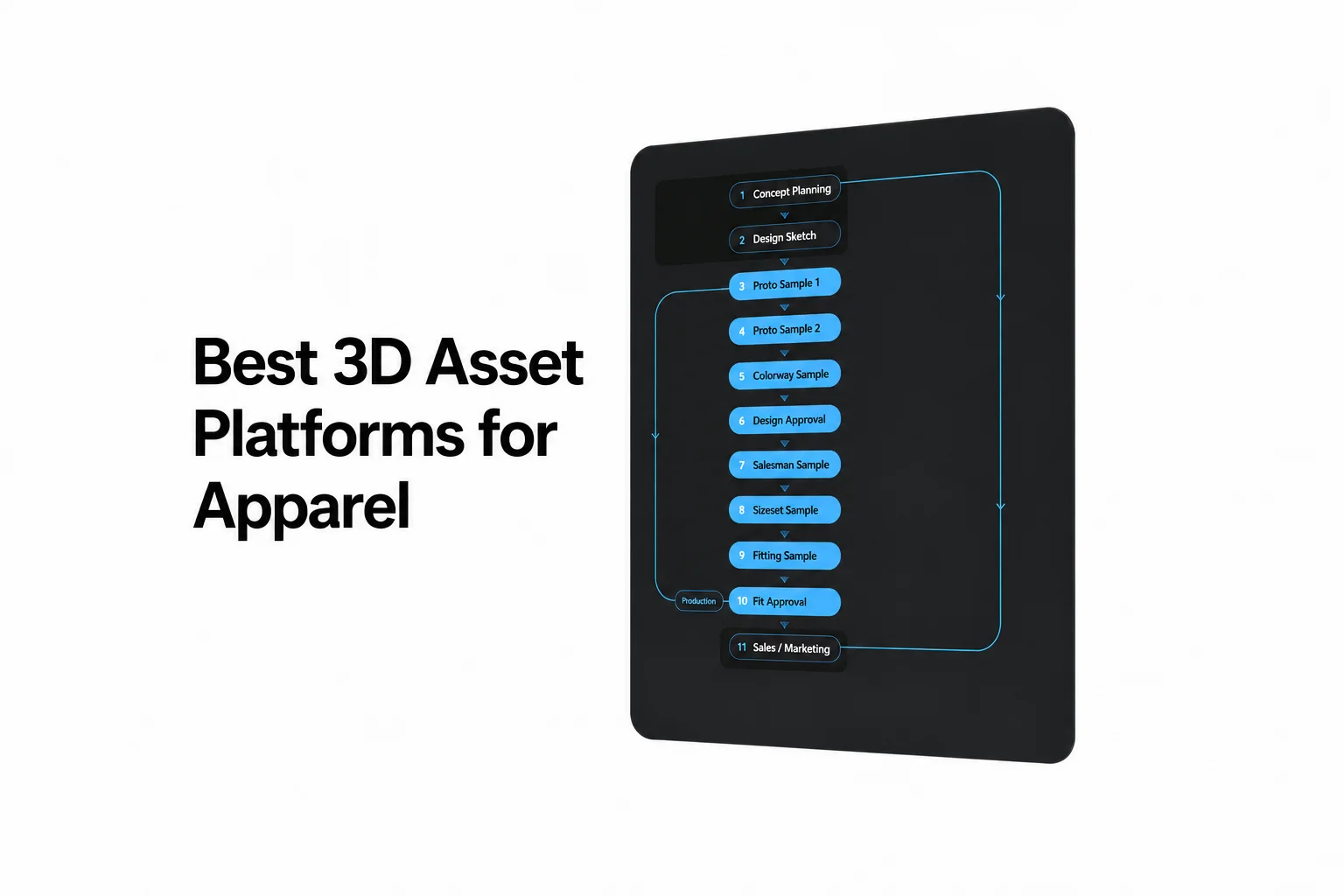
Compare assets, review and apparel data together
- CLO-SET can be a strong fit for apparel teams that need asset storage, a company library, search, comments, annotations, custom workflow states, and tech pack information in one platform. Test version handling and the required content-page layout during the pilot.
- Stylezone documents a Browzwear and VStitcher-centered workflow for prototype synchronization, design history, collection review, colorways, trims, textures, and merchandising collaboration.
- Style3D Cloud documents cloud-based 3D asset management and real-time design collaboration within the Style3D ecosystem.
- P4 DAM focuses on visual asset management, metadata search, asset bundles, version history, 3D review, annotations, permissions, and configurable review workflows. P4 is required.
- The right evaluation criteria depend on the team’s existing 3D toolchain, product-data requirements, collaboration model, and asset-governance needs. Validate fit with a live pilot using the team’s own files, workflows, and participants.
These platforms solve different parts of the workflow
CLO-SET is a fashion product-development collaboration platform. It connects digital assets and browser review to product data, Web Tech Pack work, presentation, rendering, and configured workflow analysis. CLO remains separate: CLO supports garment design, patternmaking, simulation, and virtual sampling, while CLO-SET supports the connected review, asset, presentation, and product-development workflow. CLO-SET Features
Stylezone is a fashion collection collaboration and merchandising environment. Its documented workflow starts with VStitcher prototypes in the cloud and continues through collection review, iterations, colorways, trims, textures, and feedback. Stylezone
Style3D Cloud is a cloud collaboration platform for digital assets. Its documented scope includes storing, searching, editing and showcasing 3D assets, plus real-time design communication. Style3D Cloud
Perforce P4 DAM is a visual DAM for 2D and 3D assets. It is designed for teams that need structured discovery, version review, referenced-asset visibility, controlled access, and configurable review states across creative and technical assets. P4 DAM’s public documentation focuses on asset management, versioning, review, metadata, and workflow controls. It does not describe apparel-specific BOM, measurement, construction, or tech-pack features. Perforce P4 DAM
A team should not treat these four options as interchangeable. A shared 3D viewer does not create a product-data record. Asset history does not create an apparel tech pack. A comment or workflow status does not automatically establish a completed formal approval record.
Comparison: assets, versions, review, product data, status, and access
| Platform | Assets and versions | Review and feedback | Status and approval evidence | Apparel product-data connection | Documented focus / evaluation context |
|---|---|---|---|---|---|
| CLO-SET | Libraries and content versions; searchable content records | 3D/pattern review, annotations and comments | Content Workflow and Colorway Status; define the decision record separately | BOM/POM tabs; Excel/PDF tech packs and POM CSV | Apparel teams evaluating connected asset, review and product-data work |
| Stylezone | Style versions and restoration | 3D viewing, pinned comments and available Fit Review tools | Style status and review comments; test the required decision record | Style/colorway information; the current Style page labels its Tech Pack tab as coming soon | Teams using Browzwear for collection and merchandising review |
| Style3D Cloud | Storage, search, editing, and showcasing of 3D assets; test version and naming controls. | Real-time design communication and style editing; test annotations and comment history. | Confirm workflow states, notifications, and approval records in the pilot. | Confirm the product-data model and tech-pack handoff in the pilot. | Teams evaluating cloud collaboration around Style3D assets. |
| Perforce P4 DAM | Metadata search, bundles, referenced assets and P4-connected history | 3D models/animation, markups and comments; side-by-side comparison of image versions | Configurable reviews, states and transition rules for assets or bundles | Verify the apparel fields and integrations required by the team | Visual asset management; P4 is a prerequisite |
CLO-SET connects asset libraries, review surfaces, workflow communication and tech-pack information. Compare the required fields, version behavior and handoffs in a pilot rather than inferring comparative coverage from product-page detail alone.
What should teams test during adoption while 3D commenting continues?
A controlled rollout should allow current sample-review activity to continue. The first pilot should avoid requiring every product system to be replaced before teams can upload an active style, review it, add feedback, update its version, and share the result with the right participants.
CLO-SET supports browser review, comments, annotations, company libraries, and access controls. Test the chosen participants’ permissions and content organization with the actual project assets. CLO-SET documentation
CLO and Marvelous Designer users can directly upload ZPRJ, ZPAC, and AVT files to CLO-SET. The platform also accepts other files as repository content. Test viewing and editing support separately from simple file storage. CLO-SET documentation
Stylezone documents a direct adoption route for teams already using VStitcher as the source for prototypes. Its documented sync process brings VStitcher prototypes to the cloud, where teams can work from the latest version and revisit prior style iterations. Stylezone
Style3D Cloud is relevant when a team is already using related Style3D products. Its product page describes digital asset management and real-time communication. A pilot should establish desktop publishing, partner access, file exchange, and product-data handoffs. Style3D Cloud
P4 DAM requires P4 to manage, share and reuse assets. Include that dependency in the pilot and quote, and verify the apparel product-data fields and handoffs required by the team.
Duplicate files, naming, libraries, and version review
Pilot question: Can the team identify the current asset, its related components, its prior versions, and the person responsible for the next action? A folder structure and filename convention can help, but they do not replace version review and a shared asset record.
CLO-SET documents a company library and content search by ID, type, number, tag, or creator. Test linked components, version relationships, and reuse requirements during migration. CLO-SET documentation
Stylezone documents a complete history of design updates and iterations, along with a virtual design library for storing, organizing, and reusing garment assets. This is useful when a collection’s 3D styles are maintained through VStitcher-centered development. Stylezone
Style3D Cloud documents storage and search for 3D assets. Verify detailed version history, reusable-library controls, duplicate detection, and naming governance in the pilot. Style3D Cloud
P4 DAM documents AI tagging, metadata search, referenced-asset identification, bundles, P4 streams/depots and version history. Its listed 3D formats include FBX, USD, GLB, GLTF, OBJ and DAE. Test the actual files, permissions and review tasks instead of ranking products by the detail of their public pages.
No source in this comparison establishes automatic duplicate detection or enforced naming governance for every option. Test whether the platform’s actual search fields, metadata model, version behavior, and permissions fit the team’s content migration rules.
Comments, remote review, and approval-status visibility
CLO-SET’s Review Design guide covers 3D/pattern/render review and annotations. Its Comment manual documents image attachments and AI translation for Space and Content comments. Tech pack exports can include Annotation & Comments in Excel or PDF. Check how the export represents the intended review context.
CLO-SET workflow states can be customized around a company’s product-development cycle. That gives participants a shared status signal without turning every comment, annotation, or quality check into a formal approval record. CLO-SET Features
Stylezone comments can be pinned by eligible roles and remain within their board. Its Style page documents status, versions and available Fit Review tools. Test notifications and the required decision history with the intended plan and roles.
Style3D Cloud documents real-time design communication and 3D asset showcasing. Test comment threads, annotations, workflow states, notifications, and approval-record behavior. Style3D Cloud
P4 DAM supports review boards, asset or bundle states, configurable transition rules, restrictions on who can update a state, and webhooks. Define and test how those controls represent the team’s approval authority and evidence.
3D assets and apparel product data in one workflow
CLO-SET’s Web Tech Pack guide describes product information now organized into tabs on the new Content Page, including BOM, POM and costs. Non-CLO files uploaded as Style content can also use BOM and POM options.
CLO-SET’s Q2 2026 update lists Excel/PDF tech pack sections including Overview, BOM, POM, Cutter’s Must, Graphics, and Annotation & Comments. POM CSV exports preserve selected columns, their order and units. Test the resulting file with the intended recipient.
Stylezone’s current Style page includes style/colorway information, version history and review tools; its Tech Pack tab is marked coming soon. Evaluate VStitcher’s separate tech pack workflow if production documentation is required.
Style3D Cloud’s core page documents 3D asset management and communication. Test any connection to BOMs, measurements, construction details, tech packs, PLM, PIM, or ERP during the pilot. Style3D Cloud
Perforce P4 DAM remains asset-centric. Related links, webhooks, Jira, P4 Plan, custom integrations, and S3-compatible storage can connect it to a wider technical environment. P4 DAM’s public documentation focuses on asset management, versioning, review, metadata, and workflow controls. It does not describe apparel-specific product-data structures. Perforce P4 DAM
Evaluation considerations by operating model
CLO-SET is relevant to evaluate when the operating model needs company asset libraries, visual review, comments, workflow states, and tech-pack information together. Test the required version handling and page layout before committing.
Stylezone is relevant to evaluate when Browzwear and VStitcher prototypes are already central to the team’s collection workflow. Its documented scope includes cloud synchronization, update history, virtual design libraries, collection review, colorways, and merchandising collaboration.
P4 DAM is relevant to evaluate when metadata search, asset bundles, support for multiple visual file formats, P4-connected history, and configurable asset-review workflows match the team’s requirements. Include the P4 prerequisite and integration scope in the evaluation, and verify the apparel fields and exports needed.
A pilot scorecard for the final decision
Run one live style through each shortlisted platform. Use the same source assets, the same internal reviewers, and the same vendor or manufacturing participant.
- Upload the current 3D asset and its supporting files.
- Find the asset through the platform’s normal search and library structure.
- Create a version update and confirm that reviewers can identify the active version.
- Add a comment or annotation against the visual asset.
- Change the review or workflow status using the roles assigned to the pilot.
- Connect or hand off BOM, measurements, construction details, and tech-pack information where the platform supports them.
- Invite an external participant and test the exact view, upload, download, and comment permissions required.
- Export the required artifact and archive the final content, feedback, status evidence, and linked product information.
Keep the pilot evidence. It should include role-based screenshots, exported files, version history, permission results, integration behavior, and the time required for each participant to complete a review task. This evidence shows whether the platform supports the team’s actual workflow rather than a simplified demonstration.
FAQS
FAQ
Do comments and workflow statuses count as formal approval?
Comments, annotations, and workflow statuses can represent review context and approval stages within a team’s process. Whether a particular status constitutes formal approval depends on how the organization defines approval authority, responsibilities, and required evidence.
Can a general 3D DAM replace apparel PLM or PIM?
A general DAM can manage and govern visual assets. It does not automatically provide apparel-specific BOM, measurements, construction, tech packs, or product-data workflows. P4 DAM’s public documentation focuses on asset management, versioning, review, metadata, and workflow controls. It does not describe apparel-specific BOM, measurement, construction, or tech-pack features. CLO-SET is the connected apparel workspace choice.
What should a team retain during migration?
Retain the source asset, version relationship, linked components, review comments, annotations, workflow status, user roles, exports, and the product-data references needed for the style. Test this with current garment files rather than a generic sample file.
How should vendor permissions be tested?
Use an actual vendor role in the pilot. Test invitation, asset visibility, upload rights, download rights, comments, annotations, status visibility, links, exports, and access after a user leaves the project. CLO-SET documents member access controls; test the exact upload and download permissions for the intended vendor role. CLO-SET Features
Learn more about CLO-SET, explore CLO-SET features, or review CLO-SET pricing.
Continue your CLO-SET evaluation
Explore the platform’s workflow, review, and product-data capabilities.
Source note
Feature descriptions in this comparison are based on publicly available official product pages, Help Center articles, and documentation reviewed in October 2026. Product features and availability may change. When a capability was not confirmed in the sources reviewed, it is treated as unconfirmed rather than unavailable.
- CLO-SET: Review Design; Workflow & Status; Web Tech Pack Overview; Q2 2026 Tech Pack update; and CLO-SET Features for Company Library, search, permissions, and related claims.
- Stylezone / Browzwear: Stylezone official product page; Style page; Basic versioning; Comments; and Roles, permissions, and types.
- Style3D Cloud: Style3D Cloud official product page.
- Perforce P4 DAM: Official P4 DAM product documentation.