Before Full PLM: 6 Tools for Product Data and Milestone Management
Compare six tools for managing product data and milestones before adopting full PLM, including when apparel teams may want a focused product-development workspace like CLO-SET or broader lifecycle management.
Before Full PLM: 6 Tools for Product Data and Milestone Management
- Use a configurable product database when teams need structured records linked to owners, files, variants, and status.
- Use a documentation workspace when specifications and decision notes are the main shared reference.
- Use a project tracker for launch work, an issue tracker for software-focused work, and a spreadsheet for a small, simple list.
- For apparel style data and browser-based 3D review, CLO-SET offers a focused fashion product-development workspace with comments tied to content and version context.
Before adopting a full product lifecycle management (PLM) system, a team can choose a tool by the record or handoff it needs to control. A tracker can make owners and dates visible. A documentation space can hold specifications and decisions. A product-data workspace can connect those records to garments, versions, and review context. A product record describes the item, while a tracker assigns the work and date needed to move it forward.
The practical choice is the narrowest tool role that can support the product records, milestones, and evidence your team needs to rely on. For apparel teams working with style and Colorway data, 3D files, visual review, digital assets, and Tech Pack information, CLO-SET is a focused fashion product-development workspace to assess. This can be relevant to teams exploring PLM-related workflows when their immediate priorities are product development, 3D visualization, review, and apparel-specific collaboration. Broader PLM systems address a wider scope when teams need formal control across the product lifecycle, defined processes for product changes and releases, and connected workflows across additional business functions.
Start with the work the tool will own
| Tool role | Primary record or activity | Fits when |
|---|---|---|
| Configurable product database | Structured products or styles, related records, owners, attributes, and status | Teams need repeatable records and relationships instead of free-form notes |
| Documentation workspace | Specifications, decisions, and supporting context | Teams need a readable shared reference, and document-led work is the main need |
| Project or milestone tracker | Work items, owners, dependencies, dates, and phase progress | Teams need to coordinate execution against a calendar or launch plan |
| Issue tracker | Requirements, defects, engineering tasks, and releases | Product work is closely tied to software development and technical changes |
| Spreadsheet | A short, flat list with a small number of fields and straightforward updates | A few people maintain a stable list with simple handoffs |
| Fashion workspace | Style and collection context, product files, and apparel review activity | Apparel teams need to review garment versions and coordinate style work in context |
These roles can coexist, but every important field needs an accountable home. Siemens describes PLM as connecting data, people, processes, and software across the product lifecycle, with product requirements, design collaboration, a lifecycle BOM, and response to product change among its stated capabilities. That description helps set the boundary: a focused tool can support specific product-development or coordination needs, while broader PLM provides formal control over product information and changes across lifecycle stages and teams.
1. Configurable product database: structured records and relationships
A configurable product database fits when a team keeps returning to the same questions about each item: what is it, which version is current, who owns it, what stage is it in, and which other records belong to it? A structured record gives those questions consistent fields instead of burying answers in a different paragraph, email, or filename each time. The value comes from modelling the information once and applying the same pattern to each product or style.
For example, an apparel team might create one record per style and relate it to colorways, fabrics, trims, a tech pack, a review round, and a launch milestone. Product attributes could include style ID, season, owner, development stage, target date, and a link to the current design file. This arrangement suits work where users need to filter a collection by season or stage, or quickly see which items still need an owner or a decision.
A database role works especially well when the team has a clear idea of its record types and the relationships between them. If the team needs to distinguish a style from each colorway, it should represent them as separate but linked records rather than placing every fact in one crowded row. If each item only needs a name, an owner, and a date, a spreadsheet may be easier to maintain.
A product-data database also needs clear rules for current product information. Decide who can change an attribute, what values are allowed, and which tool is the main reference when two tools show different statuses. GS1’s Global Traceability Standard describes the use of globally unique identification keys for products, locations, and other physical or intangible entities, and explains how shared identifiers can support interoperability between systems. A team can apply the same practical principle by assigning stable IDs to styles and colorways and reusing them in files, review records, and milestone lists.
This role is a good fit when consistent, reusable product data is the main gap. It can support straightforward records and connected views. As requirements grow, teams may need clear processes for product changes and releases, and tools that connect information across more lifecycle stages.
2. Documentation workspace: specifications and decisions in context
A documentation workspace is a sensible starting point when the most important need is a place people can read and understand the product definition. Use it for a specification narrative, construction notes, fit comments, meeting decisions, supplier instructions, or rationale behind a product choice. This role is especially useful when people need the story and reasoning behind an item as much as they need a status field.
A team might make a specification page for a style and organize it under a season or collection. The page could record the intended material, key measurements, construction notes, open questions, and the decision from a review meeting. An adjacent decision log can state what changed, why it changed, who owns the next action, and which linked file or version the decision refers to.
Document-led work suits new processes that have not yet settled on a fixed set of attributes. A team can learn which product facts recur before building them into structured fields. This can also be useful when a product specification needs explanation, images, or discussion that would feel cramped in a row-and-column list.
The boundary appears when readers need reliable rollups across many items. A page is easy to read, but comparing the owner, status, target date, or open issue across a large assortment takes more care if those values live in prose. Teams can keep the documentation workspace for specifications and meeting context while assigning searchable status and ownership to a structured product record or milestone list.
For a lightweight setup, give each specification a stable style identifier and a link to the exact file version under review. Keep one current specification location, label superseded material clearly, and place decisions near the section they affect. Those practices help a document remain useful without turning it into the only tracker for every workstream.
3. Project or milestone tracker: execution, owners, and dates
A project tracker fits when product information is already available and the immediate problem is coordinating the work required to reach a launch or review gate. It gives a team a place to name tasks, owners, target dates, dependencies, and phases. This makes it useful for seeing whether design review, sourcing, costing, fit, or marketing work is on schedule.
A milestone is a dated point in a plan, such as a first review, a decision deadline, or a production handoff. A tracker can connect the tasks that lead to the milestone and show the person responsible for each next action. In a collection plan, one team could group work by season and line, then view outstanding tasks by owner or due date.
This role answers “what work remains, who is doing it, and when is it due?” The task board records work to complete, while the product specification remains in its designated record. A task named “update measurement chart” can point to a style record and file, but the task board should not become an accidental duplicate of the measurement values themselves.
Keep the product record and execution task connected with the same identifier. If a milestone depends on an approval, link to the decision record or review context that defines the gate. If the team changes the milestone date, record the new date and the owner of the change in the place where project timing is managed.
A project tracker is a strong fit when many roles share dependencies and dates, but it is a secondary product-data home. Keep product attributes in the structured record or specification and let the tracker show the work needed to complete them. That split helps keep current product information separate from timeline updates.
4. Issue tracker: requirements, defects, and software releases
An issue tracker makes sense when product work is organized around discrete technical requests, defects, and changes that move through a defined workflow. Software teams use issue-shaped work to connect a requirement to implementation, testing, and a release. The record usually describes the issue to resolve, its owner, priority, status, and related technical work.
This role is useful to apparel product and operations teams when an internal application or digital product is part of the process. A team may use issues to report a problem in a product-data workflow, request a feature, or track a test defect before a software release. It can connect that technical change to the business request that prompted it.
A garment style, colorway, BOM, or sample review round is a different kind of record from a software defect. Teams can link a technical issue to the relevant style ID or review record, while maintaining the garment specification and its approval context in the system designed for that work. Treating every product attribute as an issue makes it harder to see a full collection or compare consistent fields across styles.
Choose this role when engineering tasks and release work are the central workflow. For seasonal apparel development, pair issue tracking with a product-data or fashion workspace when style-level records, product files, and visual review need their own context.
5. Spreadsheet: a small and simple interim list
A spreadsheet remains a reasonable choice when the team has a small set of items, a short list of fields, and a clear person responsible for keeping the list current. A simple sheet can show item, owner, status, and due date in a familiar grid. It is quick to adapt when the process is still taking shape and the team needs a first view of work in progress.
For example, a small team with 12 styles might use one row per style, with columns for style ID, season, owner, next review date, and a link to the current file. If only one or two people update the sheet and everyone else reads it, that structure may provide sufficient visibility while the team settles its process.
A spreadsheet stays easy to manage when each row describes one kind of thing and each field has one meaning. The team should agree on allowed status values, avoid putting several style records into one cell, and assign an owner for changes. When colorways, components, vendors, reviews, and milestones all need separate relationships, a flat grid becomes harder to scan and update consistently.
The clearest growth signals are repeated copies, conflicting statuses, unexplained changes, and time spent reconciling values across tabs. At that point, move the relevant record type into a database, documentation workspace, or fashion workspace and retain the spreadsheet only for a specific export or analysis task. Put a stable ID and a link to the authoritative record in any spreadsheet that remains in use.
6. Fashion workspace: style context and 3D review
Apparel teams need a role that keeps review attached to the garment, style, and Version being discussed. CLO-SET is a focused fashion product-development workspace for teams coordinating garment files and Web Tech Pack information, with browser-based review and version-linked collaboration documented on its product pages.
In the file handoff, a garment created in CLO opens in a browser in CLO-SET for team review. Reviewers can view the garment as it left CLO and use Comments, Annotations, and other review context while discussing the specific item.
Comments remain associated with the Content, while Version information helps teams understand which file iteration the feedback relates to. Teams can review comments across Versions or focus on the current Version.
That link between the visual reference and the version matters when a style changes during a review round. A comment about a sleeve or seam can be understood alongside the relevant garment version, rather than as an isolated note in a separate task. Teams still define who is responsible for resolving a comment and recording the resulting decision.
CLO-SET also connects product documentation to its 3D file through Web Tech Pack. Its product page describes BOM, points of measurement (POM), and Cost Estimation information filling from a 3D file, with the Tech Pack following a new file Version. That workflow is relevant when the team needs style review and product documentation to stay connected as the file changes.
CLO-SET documents Workflow & Status among its browser-based review and collaboration surfaces. Workflow applies at the Content level, while Status applies at the Colorway level. Digital assets, style and Colorway context, and Web Tech Pack information can be considered together with browser-based 3D review and product-development collaboration.
These capabilities make CLO-SET relevant to assess when a team’s priorities center on fashion product development, including garment files, style and Colorway context, 3D visualization and review, digital assets, and associated Tech Pack information.
For teams exploring PLM, CLO-SET provides a more focused environment around these apparel-specific workflows without requiring the full scope of an enterprise lifecycle-management system. Organizations with broader lifecycle-governance requirements can evaluate how a focused fashion workspace fits alongside their existing systems or broader PLM architecture.
Separate review activity from the approval record
Comments, Annotations, Quality Check, Workflow, and Status may provide review context. They do not automatically create formal approval. Workflow applies at the Content level, while Status applies at the Colorway level. Whether a Workflow or Status value represents formal approval depends on the organization’s own process, responsibilities, and authority rules. A team should define what counts as approval and where the designated approver records it.
A useful decision record names the item and Version, the decision maker, the date, the outcome, and its meaning. It should also link to the evidence reviewed and state the next action, such as revise, proceed to the next review, or release the specified version. Those details let a colleague understand which item was considered and what the team decided.
For everyday apparel coordination, define a lightweight gate before review begins:
- Identify the style, colorway, and exact product or file version under review.
- Name the person or role authorized to decide at that gate.
- State the available outcomes, such as approve, revise, or hold, and explain each one.
- Record the decision date, rationale where needed, and next owner or action.
- Link the decision to the review evidence and the product record that owns the status.
A review comment signals useful feedback. The gate record carries the decision the team has defined.
Keep product information consistent across a small tool stack
A small tool stack works when everyone knows where to find current information. Decide which tool holds current product information, which one owns milestone dates, where the current specification lives, and where the final decision is recorded. Link these places instead of copying the same status and details into every workspace.
Use one stable identifier for each product record and preserve it in linked work. A style ID can appear in a product database, a spec page, a milestone task, and a garment filename. Add a separate identifier for a colorway when a decision applies to one colorway rather than the full style. The GS1 traceability standard explains that shared, unique identifiers and standard data exchange can help systems interoperate. For a lightweight product-development stack, a consistently reused internal identifier provides a practical link even when the team is not using GS1 keys.
Next, choose one owner for each status. The project tracker can own the milestone date, while the product-data record owns the style development stage. A review platform can hold the comment thread and visual reference, while the approval record states the formal outcome. Those boundaries help prevent a changed task status from being mistaken for a product release decision.
Use links to connect detailed evidence to the record that summarizes it. A product row can link to the current specification and garment version. A milestone can link to the required decision. The decision record can point to the file reviewed. If a value must appear in more than one place, decide which location should be the main reference and how updates reach the other views.
When several near-identical files circulate, record what changed, the affected version, who reviewed it, and the decision that followed.
Signals the team is ready to assess full PLM
A team may want to assess broader PLM when it needs product information and changes managed consistently across multiple lifecycle stages, business functions, and connected systems.
- complex product structures spanning many related components, variants, and relationships
- formal control over how product information is defined, changed, and approved
- controlled processes for product changes and releases across teams
- BOM information that must stay in step across enterprise systems
- a defined release process, including who can approve or release a product Version
- handoffs involving teams beyond the product-development workspace
- repeated manual work to compare and align product information across multiple systems
Some of these needs can already be addressed within a focused fashion product-development environment. CLO-SET connects style and Colorway context, 3D assets, review, Versions, BOM and other Tech Pack information, and cross-functional product-development workflows.
With CLO-SET 2.0, scheduled for release in November 2026, this scope expands from planning through production, giving teams a more connected way to collaborate with suppliers across each stage of product development. This includes workflows for material development, sample requests, order requests, product information, reviews, and handoffs between internal teams and external partners. Page Editor also adds more flexible planning and product-information views that teams can configure around their own processes.
Broader PLM becomes more relevant when organizations need formal control across the product lifecycle, clear processes for product changes and releases, or product information managed across additional functions and systems.
Assess PLM based on the complexity of product relationships and the level of formal control the organization needs. For example, a small team managing complex variants and traceability may need a system with stronger control over product information and changes, while a larger team with a simple, stable catalog may work well with a lighter setup. Consider product complexity, governance requirements, lifecycle scope, and connected systems rather than company size alone.
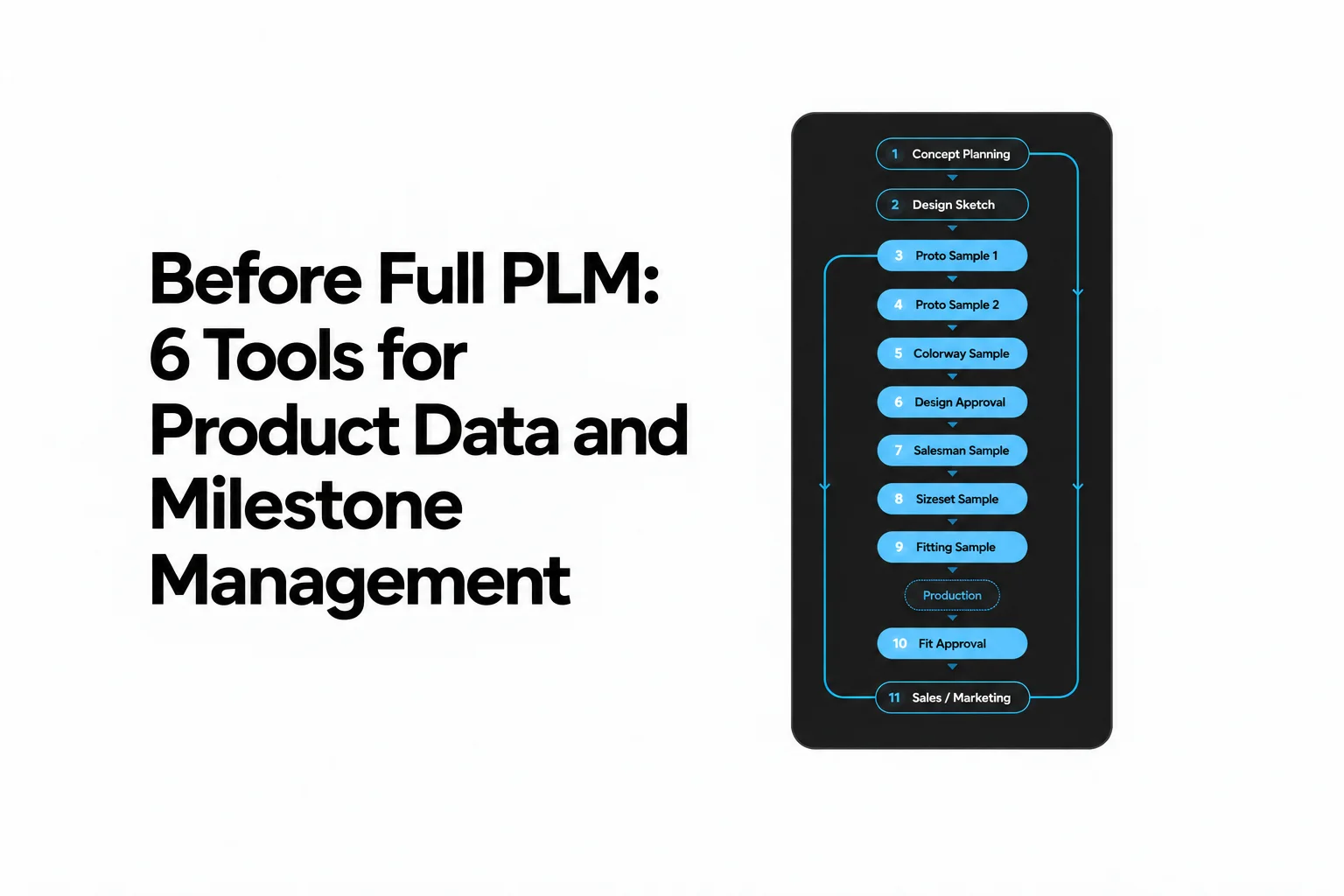
Before evaluating systems, write down which product information and decisions need clear rules and approval. Map one style from initial definition through revision, review, and production handoff. Mark which tools hold the item identity, product attributes, approval outcome, and approved or released product Version. The gaps in that map show whether the next step is improving a focused product-development environment, connecting existing systems, or adopting broader lifecycle management.
FAQ
Can a spreadsheet track product approval milestones before PLM?
Yes, when the list is small and the team has simple ownership. Keep one row per item, one owner for updates, clear status terms, and links to the current product record and decision. A structured database or fashion workspace fits better as relationships among styles, colorways, files, review rounds, and milestones grow.
Does a comment or status field count as formal approval?
Only when the organization’s defined approval process says it does and the record captures the decision in the required way. Name the decision maker, item and Version, date, outcome, and meaning of the decision, then link it to the review evidence. CLO-SET Comments, Annotations, Quality Check, Workflow, and Status provide review context. Whether a Workflow or Status value represents approval depends on the organization’s process, responsibilities, and authority rules.
Can CLO-SET replace a project tracker?
CLO-SET supports apparel teams coordinating garment Versions and 3D review alongside Web Tech Pack information. A project tracker remains useful for general cross-functional tasks, dependencies, and dates that sit outside the garment review workflow.
What is the first step when two tools show different product statuses?
Name one system as the owner of that status and correct the duplicate view from that source. Reuse a stable style or colorway ID, and link the other tool back to the main product record so the next update has a clear destination.
What is the clearest sign that a team needs more than a lightweight tool?
The clearest signal is that teams cannot consistently identify the current product definition, approved change, or released Version across linked product records. Assess broader lifecycle management when those connections and controls must be governed consistently across stages, functions, and connected systems.
Choose the next step
For apparel teams exploring PLM-related workflows but primarily focused on garment Versions, style and Colorway context, 3D visualization and review, digital assets, and Tech Pack information, explore CLO-SET’s features to see how a focused fashion product-development workspace fits your process.
Explore CLO-SET features
See how a focused fashion product-development workspace fits your process.
Source note
Product and platform descriptions in this guide are based on publicly available official documentation reviewed in October 2026. PLM references are used to distinguish focused product-development workflows from broader lifecycle-management requirements. CLO-SET 2.0 and Page Editor descriptions reflect the planned November 2026 product scope and should be checked against the final release documentation when published.
- CLO-SET review and feedback: Review Design, Comment, Annotation
- CLO-SET workflow: Workflow & Status
- CLO-SET product information: Web Tech Pack, Web Tech Pack BOM, Web Tech Pack Measurement
- CLO-SET structure: Terms & Interface
- PLM and lifecycle management: Siemens Product Lifecycle Management, Siemens Teamcenter BOM Management
- Product identification and interoperability: GS1 Global Traceability Standard
Related reading