如何管理和分享3D服装文件:时尚团队的实用工作流程
一件3D服装最初只是一个文件。然后随之而来的是齐色方案、试身修改、供应商样稿、渲染图等信息——一个开发季下来,一个款式就变成了散落在电子邮件、共享网盘和成员电脑桌面上的十几个文件。所以如果您的团队使用3D,文件混乱就不只是存储空间的问题了,它会拖慢每一次审款,甚至最后会有人用错误的版本缝制样衣。
简而言之:将所有 3D 资产集中在一个工作区,采用统一的命名和版本控制规范,集中管理面辅料库,并分享浏览器可查看的链接,而不是原始的项目文件。衡量一个系统好坏的标准很简单——团队中的任何成员(包括供应商)都能找到最新版本并直接打开查看,无需安装任何软件。
为什么 3D 文件比平面文件更难管理
Tech Pack工艺单的 PDF 文件是独立的,而 3D 服装文件则不是。
文件大小:包含高分辨率纹理的项目文件通常会达到数百兆字节——文件太大无法通过电子邮件发送,在普通共享网盘上传输速度也很慢。
依赖关系:服装文件包含了面料物理属性预设、辅料附件、贴图和虚拟模特。如果移动该文件时未包含其资源,则文件打开时会损坏。
修改版本不断增多:每次试身修改 × 齐色 × 使用场景(设计、渲染、供应商交接)都会生成一个新的文件。三个款式在几周内就可能产生几十个文件。
软件锁定:原始项目文件只能在创建它的 3D 软件工具中打开。业务人员、买手和工厂通常没有相应的权限或培训。
通用云盘无法解决这些问题;它们可以存储文件,但无法预览文件、跟踪服装版本或管理资产依赖关系。因此,3D团队最终需要的是工作流程,而不仅仅是存储空间。
步骤 1:保持单一数据来源
确定每件服装的主版本存放位置——一个统一的工作区,而不是分散在多个文件夹和收件箱中。其他所有内容(发给供应商的副本、渲染导出文件、存档文件)都由此生成。确保这一点的关键在于:如果文件不在工作区中,就等于不存在。审核、批准和交接都只参考这个中心文件,因此“哪个文件是最新的?”这个问题将不复存在。
步骤 2:便于日后查找的文件命名
命名规则只有足够简短,人们才会真正遵守。一个可行的规则是:
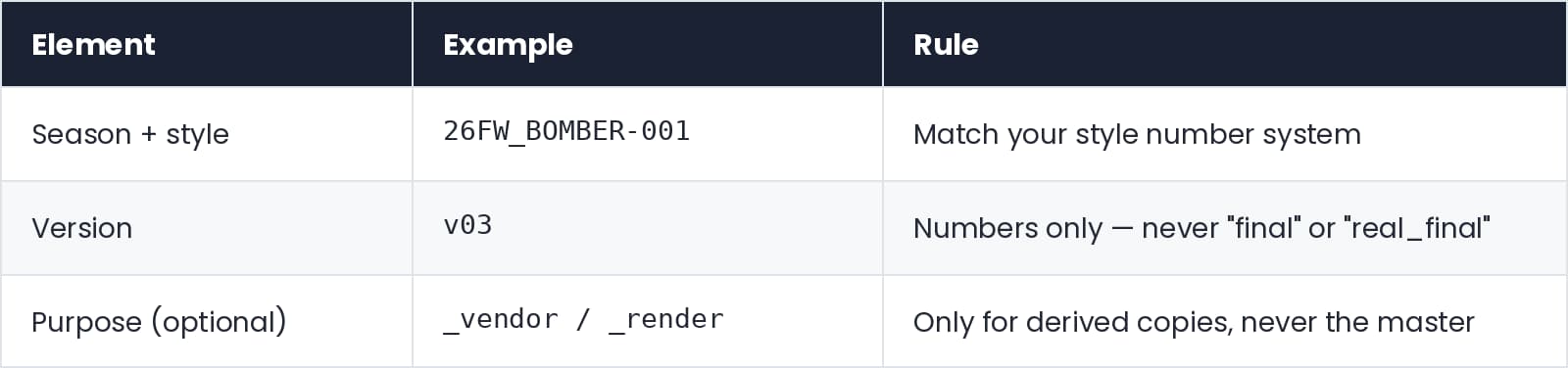 每次重大变更时,版本遍号都应向前更新,旧版本应保留(而非覆盖),以便追溯何时做出合适的版本选择。如果您的平台内置版本历史记录功能,则会自动执行此操作,文件名只需包含“开发季 + 款式”即可。
步骤 3:集中管理面料和辅料库
3D团队中重复工作最多的不是服装,而是面料。如果每个设计师都拥有自己的面料文件夹,那么同一种棉斜纹布就会被重新制作十次,且物理设置都略有不同,最终用这些面料制作的服装试身就会有所差异。因此,您应该维护一个共享的、经过审核的面料、辅料和贴图库,并明确指定谁负责添加和审核新录入的物件。新的设计开发就可以基于这个库,而不是从零开始。(后面的视频会展示在实际工作环境中是如何实现的。)
步骤 4:分享可预览的链接,而不是原始文件
审核服装的人通常不需要修改它——他们只需要查看服装、旋转翻看、放大查看某个接缝,然后留下评论。这里发送原始项目文件就显得多余,而且还会产生另一个多余的副本。所以建议分享一个基于浏览器查看的3D视图链接:
评审人员无需安装软件或购买许可即可查看服装的 3D 模型。
反馈将以评论的形式显示在服装上,而不是在单独的邮件沟通记录里。
链接始终跳转您分享的最新版本——无需在每次修订后重新附上。
对于外部合作伙伴来说,这也是更安全的方式:工厂可以在无需持有您可编辑文件的情况下,以 3D 形式查看款式结构细节。
步骤 5:按角色设置访问权限
并非所有人都能看到所有内容,需编辑的内容也不多。简单的权限划分就能满足大多数团队的需求:设计师可以编辑,内部审款人员可以评论,外部供应商只能查看与他们共享的内容。只需在工作区级别设置一次权限,而不是针对每个文件单独设置——单个文件级权限通常是信息泄露和错误频发的根源。
步骤 6:保持 3D 资产与产品数据连接
如果 3D 文件与其产品数据(例如物料清单BOM、尺寸、齐色方案)分离,每次迁移都需要手动重新描述。而当 3D 模型及其数据位于同一系统中时,服装文件就成为下游文档的源文件,而不是需要持续保持同步的另一个数据。我们另一篇文章介绍过一个最清晰的例子 : 直接从 3D 服装生成Tech Pack工艺单。
CLO-SET 如何处理这个问题
CLO-SET 是一个专为这种工作流程而构建的云端协作空间。团队将 CLO 服装文件和相关资产上传到共享工作室,且每个文件都能在浏览器打开 3D 查看器——合作者和供应商无需 CLO 软件许可即可查看服装。每个文件都有版本历史记录、评论能直接附加到资产上、访问权限在工作室层级进行控制。由于服装数据已经结构化,因此可以从同一文件生成Tech Pack工艺单,而无需手动重新创建。
在实践中它看起来是这样的——将面料、辅料、版型和虚拟模特整理到工作室中,对其进行分类以便搜索,并在服装开发过程中直接在 CLO 中调用:
[免费试用 CLO-SET ]
FAQ
3D服装文件有哪些格式?
原生项目格式(例如 CLO 的 .zprj/.zpac)包含完整的可编辑服装数据——包括板片、面料和模拟设置。而像 glTF、OBJ 或 FBX 这样的交换格式则只包含可供其他工具使用的视觉模型,但会丢失可编辑的服装数据。所以请将原生文件作为主文件保存;将导出文件视为派生副本。
如何与没有3D软件的人分享3D服装?
使用带有能在浏览器打开 3D 查看器的平台,并发送链接——收件人可以在任何浏览器中旋转、缩放和评论服装。使用屏幕截图和旋转视频也可以用于快速查看,但它们无法解答 3D 查看器能展示的问题。
我们应该保留多少个版本?
在合理范围内,尽可能保留所有版本——存储成本远低于重新协商试身选择的成本。关键在于版本顺序要清晰,并且最新版本必须明确无误。具有自动版本历史记录功能的平台无需遵循任何文件命名规则即可处理版本问题;而在共享驱动器上,只有强制执行命名规则才能确保版本一致性。
继续阅读
查看全部时尚品牌五大 3D 产品开发协作工具(2026)
如果你问一个时尚团队为什么需要3D协作工具,回答很少仅仅局限于3D建模本身。真正的挑战往往出现在多个团队和外部合作伙伴需要评审同一件服装、跟进修改,并确保审款反馈与正确的产品版本保持一致的时候。 3D协作平台解决这个问题的方式各不相同。有些专注于时尚产品开发,有些专注于产品系列协作,有些专注于3D资产管理和分销,还有一些专注于实时CAD审查。 本指南将介绍五款 3D 产品协作工具以及它们支持的工作流程。 TL;DR/ 核心速览 本指南涵盖的五款工具是: CLO-SET: 时尚产品开发工作空间,结合了基于浏览器的 3D 评审、版本管理、产品数据和网页工艺单的工作流程。 Browzwear Stylezone: 时尚协作平台,在 Browzwear 产品生态用于管理、审核和策划 系列产品。 Style3D Cloud: 用于管理、审核和分享数字时尚资产的云平台。 VNTANA:
3D样衣评审 vs 实物样流程:成本、开发周期以及什么时候仍需要实物
有些关于3D打样的宣传往往过于夸张。有人演示了一件衣服在浏览器中旋转的效果,然后得出的结论说“我们可以停止制作实样了”,但这并非事实,也让项目背负着无法兑现的承诺。更合理的论证方式是:有些样品制作环节是为了解答一些无需实际面料的问题。而3D打样技术正是在这些环节上发挥作用,节省了大部分的样衣迭代和浪费。 TL;DR/ 核心速览 3D 和实物样轮次解答的是不同的问题,从经济角度替换早期轮次,而不是替代最后轮次。 3D样评审的是个在浏览器中模拟好的服装,评审内容包括比例、款式设计、齐色、贴图位置和试身方向,过程只需几个小时,不含以往每轮消耗的材料费或运费。 实物样环节是对已缝好的服装进行评审,也是判断手感、用新面料的垂坠感、在基材上的真实颜色、洗涤和穿着性能以及工厂可生产性的唯一方法。 大多数团队会选择用混合模式:先在 3D
产前样评审:检查内容、审批人以及审核时间
当产前样到货时,真正有趣的决策环节已经结束了。廓形在头样阶段就已定型,试身也在两轮之前就确定了。剩下的是整个生产周期中最枯燥也最贵的问题:这家工厂的这条生产线和这些面料,能否每次正确地生产出这件衣服?一旦批准了,就要开始批量裁面料;如果草率地批准,那么最终阶段,到了出货样才会发现问题,那时已经没有机会进行任何修改了。 TL;DR/ 核心速览 产前样(通常简称为 PP 样)是批量生产前制作的最后一件样衣,PP 样评审决定是否批量裁面料。 必须由负责生产该订单的工厂,使用其设备,并采用经批准的面料和辅料进行缝制。其他工厂提供的优质样品则是另一个问题。 设计和试身在这时已经确定,所以这一轮不是设计评审。它只回答一个问题:这件衣服能否在这里按照规格正确且可重复地生产?