Digital Sample Review and Approval: A Complete Workflow for Fashion Teams
A fit sample lands on the desk. Someone photographs it against a white wall, drops four images into an email, and writes "shoulder looks off." Three days later the vendor replies asking which shoulder, the merchandiser has forwarded an older photo to the buyer, and the pattern maker is holding a correction nobody approved. Nobody was careless. The review had nowhere to live.
 A fit sample lands on the desk. Someone photographs it against a white wall, drops four images into an email, and writes "shoulder looks off." Three days later the vendor replies asking which shoulder, the merchandiser has forwarded an older photo to the buyer, and the pattern maker is holding a correction nobody approved. Nobody was careless. The review had nowhere to live.
TL;DR
A digital sample review is a structured round in which a sample, either 3D or photographed physical, is reviewed inside one shared workspace, with comments pinned to the garment itself, version history tracked automatically, and a recorded decision of approve, revise, or reject.
The workflow has six steps: name the round and what it decides, upload each round as a new version of the same style, pin feedback to the exact point on the garment, change the workflow status explicitly when a decision is made, update the tech pack on every round, and close the round before either opening the next version or releasing the style.
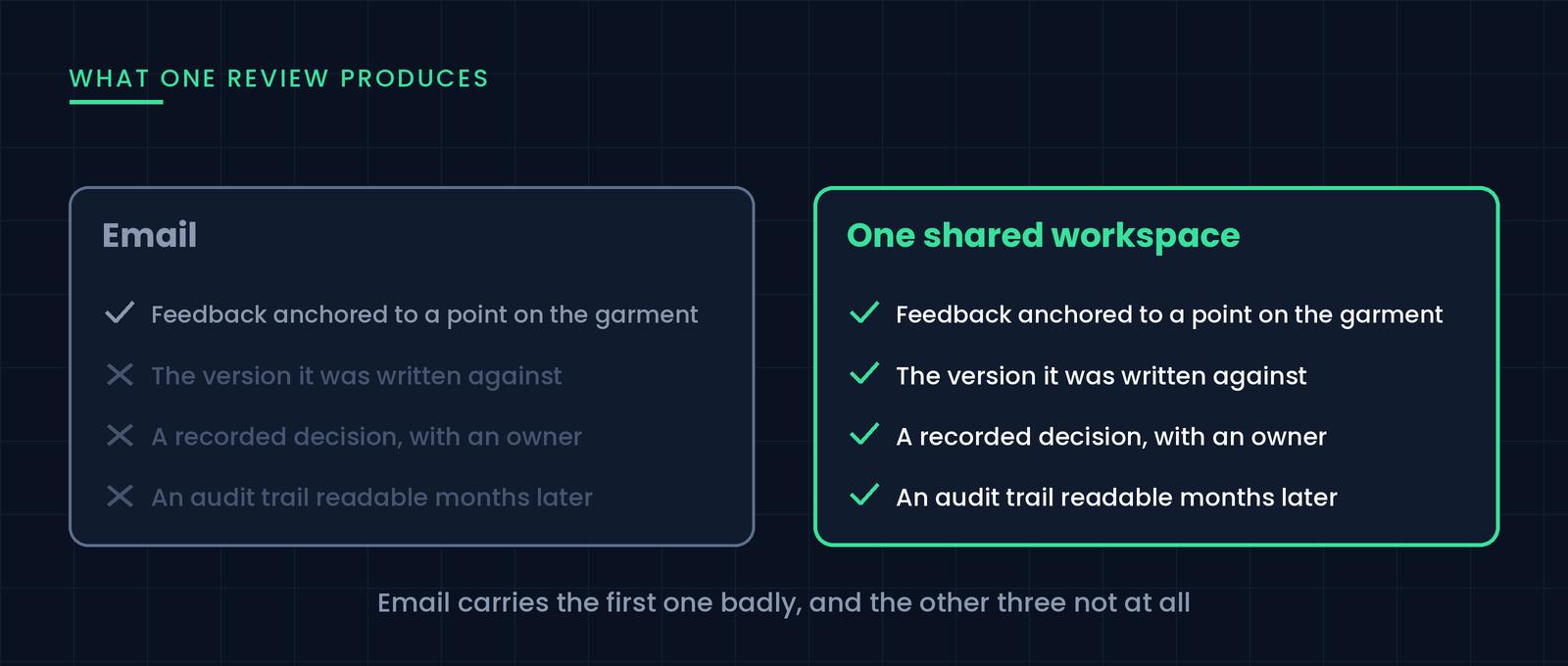
Email is the wrong container because a sample review produces four things at once: spatially anchored feedback, a version, a decision, and an audit record. Email carries the first one badly and the other three not at all.
Assign decision rights by function rather than shortening the invite list, and give every round one named decision owner. The most expensive failure in sampling is two functions each believing the other approved something.
Three physical rounds is the common baseline for a style with no unusual construction: proto, fit, and pre-production. Teams that pre-review in 3D routinely recover one of them, because proportion, colorway, and graphic placement get settled before anything is cut.
Judge sample review software on four things: a browser-based viewer that needs no license, comments pinned to the asset, versioning that lives on the record and not in file names, and explicit decision statuses. A reviewer who can't open the file doesn't review it.
A season is dozens of styles sitting at different rounds on the same day, so define your workflow statuses once at company level and keep a collection-level view alongside the per-style history.
Australian fashion group APG & Co, which owns Saba, Sportscraft and Jag, reported a 50% reduction in development and fit sampling costs in FY25, with 100% of styles across the three brands on CLO and CLO-SET. Designing in 3D got them part of the way. The saving landed once reviewing, versioning, and approving moved into a shared workspace too, because physical samples became confirmations rather than experiments.
What Is a Digital Sample Review?
A digital sample review is the process of evaluating and signing off on a garment sample using a shared digital record rather than email, chat, and printouts.
Two terms get mixed up here, and the distinction matters when you're choosing tools. A digital sample is the asset: a 3D garment, a set of turntable renders, or a photographed physical sample. A digital sample review is the process wrapped around that asset, covering who looks at it, what they comment on, which version they commented on, and what was decided.
You can run a digital sample review on a physical sample, and most teams do for the later rounds. The garment is real, the review is digital, and the photos, measurements, comments, and approval stay in one place.
Why Email-Based Sample Reviews Break Down
A sample review produces four kinds of information at once, and email carries one of them well.
Feedback loses its anchor. "The shoulder looks off" is unusable without a point on the garment attached to it. The reader has to reconstruct which image, which view, and which seam.
Versions fork silently. Every attachment is a copy. Once two people reply to different messages in the thread, there are two live versions of the truth and no way to tell which is newer.
Decisions stay implied. Threads end when people stop replying, not when someone decides. Weeks later, "was that approved?" has no answer except somebody's memory.
Vendors see fragments. The factory gets whatever was forwarded, rarely the full picture and never the version history. They fill the gaps with assumptions, and the assumptions show up in the next sample.
The expensive part of all this is the extra round that gets triggered when a review ends ambiguously.
The Sample Review Workflow, Step by Step
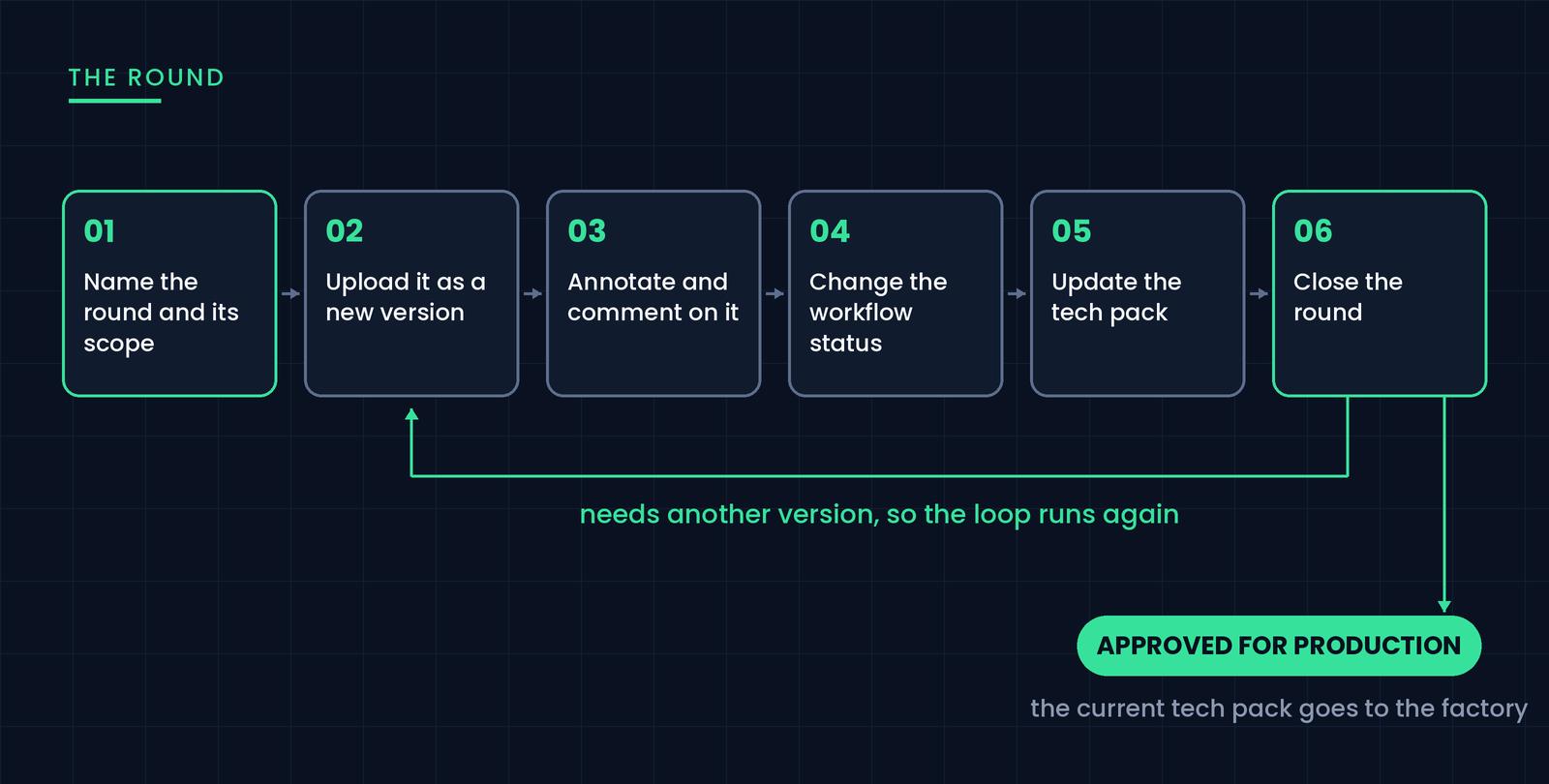
Step 1: Name the Round and What It Decides
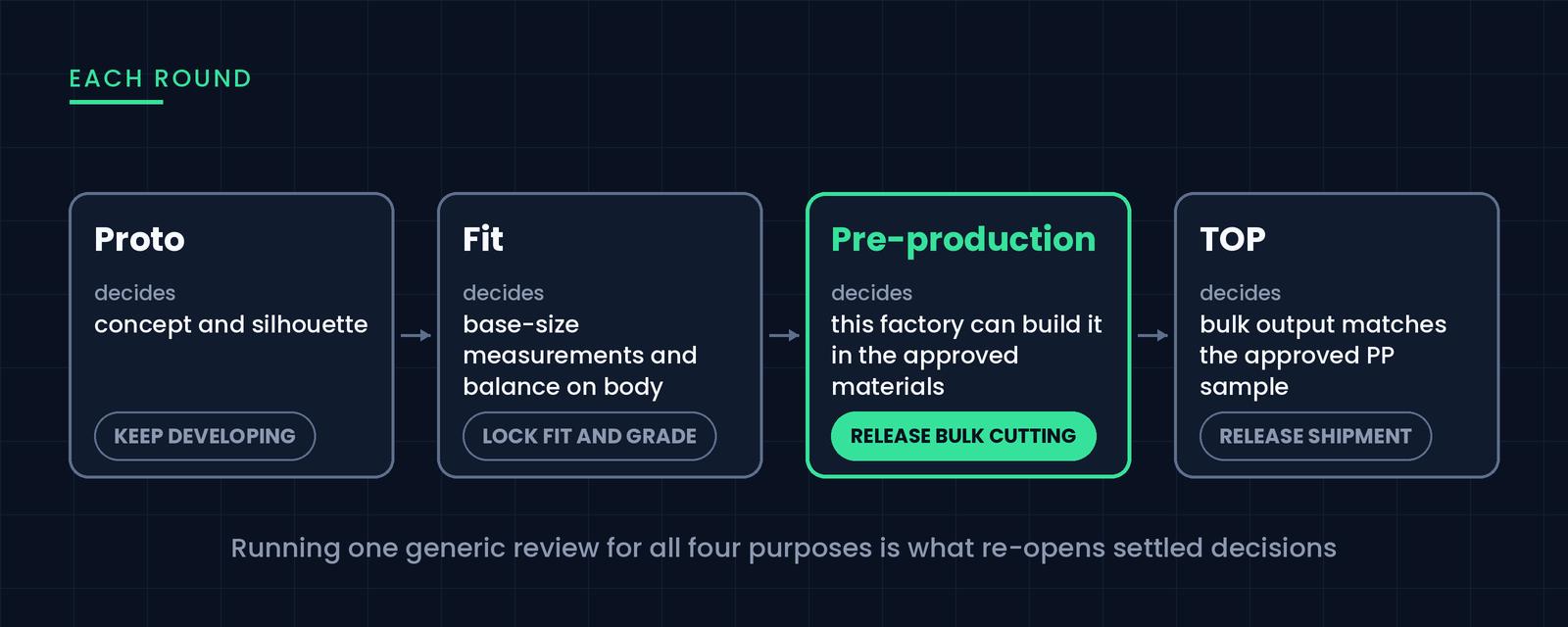
Most review confusion comes from running one generic "sample review" for four different purposes. Each round answers a different question, and mixing them re-opens settled decisions.
Proto, or first sample, decides whether the concept and silhouette are right. It does not decide graded measurements or final trims.
Fit sample decides whether the base-size measurements and balance work on body. It does not decide whether the factory can produce the style at volume.
Pre-production sample, or PP sample, decides whether this factory can build the garment correctly in the approved materials. It does not decide design direction, which is locked by this point.
Top of production, or TOP, decides whether bulk output matches the approved PP sample. It does not decide anything about the design or the fit.
Write the round type on the review itself. It sets the scope of acceptable feedback, which is the cheapest way to stop a merchandiser from re-opening a neckline during a PP review.
Step 2: Upload Each Round as a New Version of the Same Style
Everyone needs to be able to open the sample, and everyone needs to know which round they're looking at.
The reviewer who blocks your round is usually the one who can't open the file. If reviewing a garment needs a license, a plugin, or a 400 MB download, some share of your reviewers will substitute a screenshot and comment on that instead. The working standard is a browser-viewable link: click, rotate, zoom into a seam, comment, with nothing installed and no copy of your editable file in circulation.
Versioning is the other half. Each round should be uploaded as a new version of the same record, not as a new file with a new name. In CLO-SET that record is a Style inside a Room, and CLO or Marvelous Designer users can push a ZPRJ or ZPAC straight into it with Direct Upload. Because the version sits on the Style, last week's shared link still resolves, earlier rounds stay readable, and nobody maintains a file-naming convention to know what's current. (If your 3D assets are still spread across drives and inboxes, fix that first: how to manage and share 3D garment files.)
Step 3: Pin Feedback to the Garment, Not the Thread
A comment attached to a specific point on a specific version is self-explaining a month later. The same comment in an email is not.
Spatially pinned notes and threaded discussion do different jobs, and you want both. Pinned notes mark the exact point in 3D that needs to change. Threaded discussion carries the reasoning and the attachments. In CLO-SET these are Annotation and Comment, and 3D annotations export to PDF when a factory wants the markup alongside the spec.
Keep one issue per note, because a note containing four problems gets partially fixed and fully closed. State the correction, not just the observation: "shoulder point 1 cm too wide, take from the sleeve head" is actionable, while "shoulder looks off" starts another round of questions. And comment on the version you were shown, so old notes stay attached to the round they described.
Step 4: Change the Workflow Status Explicitly
Every round closes with a recorded status, an owner, and a date. Three cover most teams.
Approved. Proceed. Nothing further is expected on this round.
Approved with conditions. Proceed, but named corrections must appear in the next version. List them somewhere structural, because in the comment stream they get read once and forgotten.
Revise. A new version is required before moving on.
Use whatever vocabulary suits your calendar. What makes it a record is that the status sits on the style and changes deliberately when someone decides.
CLO-SET splits this into two fields, worth knowing before you set it up. Workflow Status is the development stage and sits on the style itself. Each colorway inside that style carries its own Status, so a style can be at one stage overall while individual colorways sit at different points. Both sets of names are yours to define in Company Settings, so "proto review" and "PP approved" mean the same thing to everyone using them. Workflow Status can be changed on several styles at once from the Workroom, and it is the field the search filter and the Line Sheet read from.
Name one decision owner per round. Skip that and you get the most expensive mistake in sampling: two functions each believing the other approved something.
Step 5: Update the Tech Pack on Every Round, Not Only the Last One
The tech pack is easy to mistake for a final deliverable that gets built once and sent to the factory. Treating it that way is where spec drift comes from.
Every round produces corrections, and the factory works from the specification, not from your review notes. A measurement change agreed in a fit review and never written into the spec reappears as a defect two rounds later. So the tech pack gets updated in the pass that closes each round, not at the end.
This is much easier when the garment data and the document come from the same source, which is the case when the spec is built on the same record the review ran on. The clearest version of that: generating a tech pack directly from the 3D garment. Building the format from scratch? There's a free production-ready tech pack template.
Step 6: Close the Round, Then Either Open the Next Version or Release the Style
Leaving a round open is how comment streams turn into archaeology. Close it: change the workflow status, confirm the corrections reached the spec, note who decided.
From there a round has exactly two exits. Either the style needs another version, so you open the next round against the new upload and the loop runs again, or the style is approved for production and the current tech pack goes to the factory. Most styles go around two or three times before taking the second exit.
Closed rounds stay readable as a record of when each decision was made and on what basis. That's what you need the next time a vendor and a buyer remember the same meeting differently.
Running This Across a Collection, Not One Style at a Time
Everything above describes one style. A season is a hundred of them at different rounds on the same day, and the problem changes shape at that scale. The question is no longer which version is current. It is which of these forty styles is blocked, and on whom.
Per style, you want the round history, the current Workflow Status, the Status on each colorway, and the open corrections.
Across the collection, you want every style in the line with its current status, so you can see what's waiting on a decision without opening forty records. This is what CLO-SET's Assortment is for: a Room built for reviewing and deciding on multiple Styles at once. Filtering the line by Workflow Status answers the merchandiser's real question, which is what is still unapproved with six weeks to go.
So define your Workflow Status names once, at company level, before the season starts. Stages invented per style don't aggregate. While you're in there, set the leadtime end status, which is what lets the platform measure how long each stage takes.
Who Should Be in a Sample Review, and What They Decide
Reviews get slow when everyone comments on everything. Assigning decision rights by function works better than shortening the invite list.
Designer decides silhouette, proportion, color, and graphic placement, and should not block graded measurements or construction method.
Technical designer or patternmaker decides fit, measurements, balance, and construction, and should not block commercial calls.
Merchandiser decides whether the style still fits the range and the price, and should not block technical corrections.
Production and sourcing decides feasibility, materials availability, and cost impact, and should not block design intent.
Vendor or factory identifies what is buildable and where they need clarification. A factory never approves its own sample.
Buyer, where one is involved, decides range sign-off and should not block individual construction details.
How Many Sample Rounds Should a Style Take?
Three physical rounds (proto, fit, PP) is the common baseline for a style with no unusual construction. Teams that pre-review in 3D routinely get one of those back, because proportion, colorway, and graphic placement get settled before anything is cut. Which rounds 3D can take and which still need fabric in your hands is a longer answer.
Your own trend is the number to watch. Rounds per style, averaged across a season, tells you whether the process is converging or just generating traffic.
What to Look for in Sample Review Software
Judge tools against the failure modes above, not against a feature list. Eight things matter: a browser viewer that needs no license, feedback pinned to a point on the garment alongside threaded discussion, versioning on the record instead of in file names, configurable decision statuses, a collection-level view, workspace-level access control, a connection to product data, and external access that doesn't cost a seat.
On where it lives: if you already run a PLM, sample review sits alongside it, not inside it, because PLM is strong at records and weak at visual review. Still deciding whether you need one? We compared the options here: Do you need a fashion PLM? 8 product development tools compared.
How CLO-SET Handles This
CLO-SET is a cloud workspace built for this workflow, organised as Spaces, Rooms, and Styles so a season has somewhere to live. The six steps above map onto it directly: Direct Upload from CLO for each new version, a browser-based 3D Viewer so vendors review without a license, Annotation and Comment for the two kinds of feedback, Workflow Status and Status for decisions, Permission for access at Space, Room, or Style level, and Assortment for the collection view. On the documentation side, the Web Tech Pack carries the spec into production: Measurement tracks 2D and 3D measurements from CLO against target measurements, Bill of Materials holds the components, and Construction and Cost Estimation complete the document the factory works from.
The clearest evidence at scale comes from APG & Co, the Australian group behind Saba, Sportscraft and Jag. In FY25 the group reported a 50% reduction in development and fit sampling costs, because physical samples became confirmations rather than experiments, and an 80% time reduction on print strike-offs, with prints, colours, and placement finalised digitally before anything was printed. By then 100% of styles across all three brands were developed and managed on CLO and CLO-SET, and 10 supplier factories had been trained and onboarded, covering half the group's woven factories.
Two things to be precise about. Those numbers come from CLO and CLO-SET used together, not from either alone: CLO is where garments are designed and simulated, CLO-SET is where they get reviewed, versioned, approved, and handed off, and a team using design software on its own still exports static tech packs and emails them out. And these are eighth-year figures. APG & Co adopted CLO in 2019, the savings compounded as adoption spread into the supply chain, and the results were assessed externally rather than self-reported: the Australian Fashion Industry Awards named the group a Best Use of Technology finalist for 2026. Read the full story, or the underlying report in Ragtrader.
FAQ
What is the difference between a digital sample and a digital sample review?
A digital sample is the asset: a 3D garment or a photographed physical sample. A digital sample review is the process around it, covering who comments, on which version, and what gets decided. A team can own plenty of digital samples and still run analog reviews over email, which is where most of the lost time sits.
How do you run a sample review with a factory that has no 3D software?
Share a link to a browser-based 3D view rather than the project file. The factory rotates and zooms the garment in any browser, and comments land on the garment instead of in a separate email chain. This is also the safer route, since they never receive an editable copy of your file.
Should sample review live in the PLM or in a separate tool?
PLM is built to hold records: BOMs, specs, costing, approvals as data. Visual review is a different job, involving large 3D assets, spatial comments, fast version turnover, and external participants who will never have a PLM seat. Most teams run visual review in a tool built for it and let the approved output feed the PLM record.
How do you keep an auditable record of who approved what?
Three things have to be captured together: the version reviewed, the decision, and the person who made it, with a timestamp. If any one of those is missing, the record won't settle a dispute. Platforms with per-asset version history and explicit workflow statuses capture all three without anyone maintaining a spreadsheet.
How do you manage sample reviews across a whole collection?
Define your workflow statuses once at company level so every style uses the same vocabulary, then keep two views: the round history per style, and a line-level view showing every style with its current status. At season scale the question is no longer which version is current. It becomes which of these forty styles is blocked and on whom, and only a collection view answers that. In CLO-SET this is Assortment, a Room for reviewing and deciding on multiple styles at once.
Do you need CLO as well as CLO-SET?
They do different halves of the job. CLO is the 3D garment simulation software where garments are designed, patterned, and simulated. CLO-SET is the connected workspace where those assets are reviewed, versioned, approved, and handed off to teams and suppliers. Design software on its own still ends with someone exporting a static tech pack and emailing it, which reintroduces the ambiguity 3D was supposed to remove. The published savings at APG & Co came from running both.
How many people should be in a sample review?
Fewer commenters than you think, with clearer decision rights. Reviews slow down because six people comment on everything, not because too few were invited. Assign each function a scope, such as fit to the technical designer and range fit to the merchandiser, and treat comments outside that scope as notes rather than blockers.
Keep reading
View all5 3D Product Collaboration Tools for Fashion Brands (2026)
Ask a fashion team why they are looking at 3D collaboration tools and the answer is rarely about 3D alone. The challenge often appears when multiple teams and external partners need to review the same garment, follow revisions, and keep feedback connected to the correct product version. 3D collaboration platforms approach that problem in different ways. Some focus on fashion product development,
3D Sample Review vs Physical Sample Rounds: Cost, Lead Time, and When You Still Need the Real Thing
The pitch for 3D sampling usually overshoots. Somebody demos a garment rotating in a browser and the conclusion lands as “we can stop making samples,” which isn’t true and sets the project up to be judged against a promise it can’t keep. The defensible version of the argument is narrower: some of your sample rounds exist to answer questions that don’t require fabric. Those are the rounds 3D takes,
Pre-Production Sample Review: What to Check, Who Signs Off, and When It Happens
By the time a pre-production sample arrives, the interesting decisions are over. The silhouette was settled at proto. The fit was settled two rounds ago. What’s left is the dullest and most expensive question in the whole calendar: can this factory, on this line, with these materials, make this garment correctly, over and over? Approve it and bulk fabric gets cut. Approve it carelessly and you